
Behind CGNAT, There Is No Port to Forward
How carrier-grade NAT breaks port forwarding, and what still works
If a port forward that should work does not, the router may not be the problem. A growing number of ISPs no longer give each customer a public IP address. They share one address across many customers using carrier-grade NAT, and behind CGNAT, port forwarding cannot work. This post explains what changed and what still works.
What CGNAT Is
CGNAT is carrier-grade NAT. The ISP has more customers than public IPv4 addresses, so it runs the same kind of NAT your router runs, one level up, on its own equipment. One public address serves many households.
Your router's WAN address is an ISP-internal address. Outbound works fine, which is why most people never notice CGNAT at all. But there is no way into your network from the outside. An inbound connection stops at the ISP's NAT, which has no record of which customer should receive it, and never reaches your router.
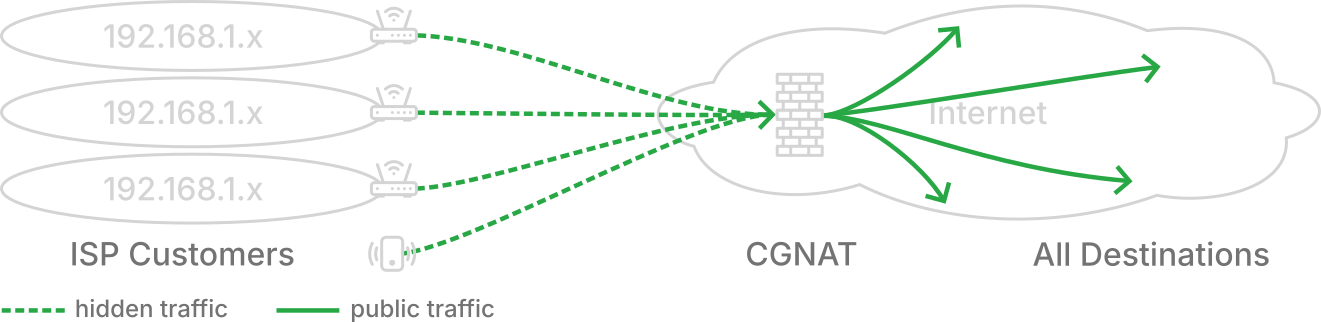
Where CGNAT Shows Up
Some kinds of internet service use CGNAT by default.
- Starlink and other satellite services, on their standard residential plans.
- Cellular and 5G home internet, and anything running through a mobile hotspot.
- Newer and smaller fiber providers, which arrived after IPv4 addresses ran out and often never hand out public ones.
- Shared-infrastructure connections such as RV parks, marinas, campgrounds, and apartment buildings with building-wide internet.
- Most ISPs across Asia, South America, and Africa, where address scarcity has been the norm for years.
Cable and the older telco DSL and fiber services in North America and Europe mostly still hand out real public addresses, though some have begun moving new customers to CGNAT.
Am I Behind CGNAT?
Address ranges and equipment layouts vary too much to eyeball this, so test the outcome instead. Three checks, from quickest to most certain.
Compare addresses. Find the WAN or Internet address on your router's status page, then search "what is my IP" in a browser on the same network. Compare the IPv4 addresses (ignore a long one with colons, that is IPv6). If they match, you hold a real public address and port forwarding should work. If they differ, something upstream of your router is translating, and the next check tells you whether you can get past it.
Test a port from the outside. This is the test that answers the real question. Set up your port forward, make sure the service is running and allowed through the machine's firewall, then probe it with an online port checker such as canyouseeme.org. Use a high port number, since some ISPs deliberately block well-known ports. If the checker reaches you, you are not behind CGNAT and any remaining trouble is configuration. If it cannot, nothing else on the internet can either.
Ask the ISP. Support can tell you whether your connection uses carrier-grade NAT, and the same conversation tells you whether a public address is available and what it costs. Ask for a "public IP address"; that phrase gets the question to the right person.
Why Port Forwarding Can't Work Behind CGNAT
A port forward is set on your router. Connections arriving on a port you name are sent to the machine you choose. That works only if the connection reaches your router, and behind CGNAT it never does. It is dropped upstream at the ISP's NAT router. No setting on your router can fix this. You don't control the ISP's equipment.
How Netrinos Gets Through CGNAT
Netrinos connects your machines into a private network. To each other they appear to be on one LAN, wherever they really are, and only the users you create can join. For a server that friends, family, or coworkers use, that replaces the public address entirely.
It gets through CGNAT because every machine connects outward. The app opens a connection out to the Netrinos service, the same direction your browser uses, and the service introduces the machines to each other over a direct, end-to-end encrypted WireGuard tunnel. When layered NATs block the direct path, traffic relays through Netrinos instead. Nothing ever needs to come inbound from the internet, so there is nothing for CGNAT to block.
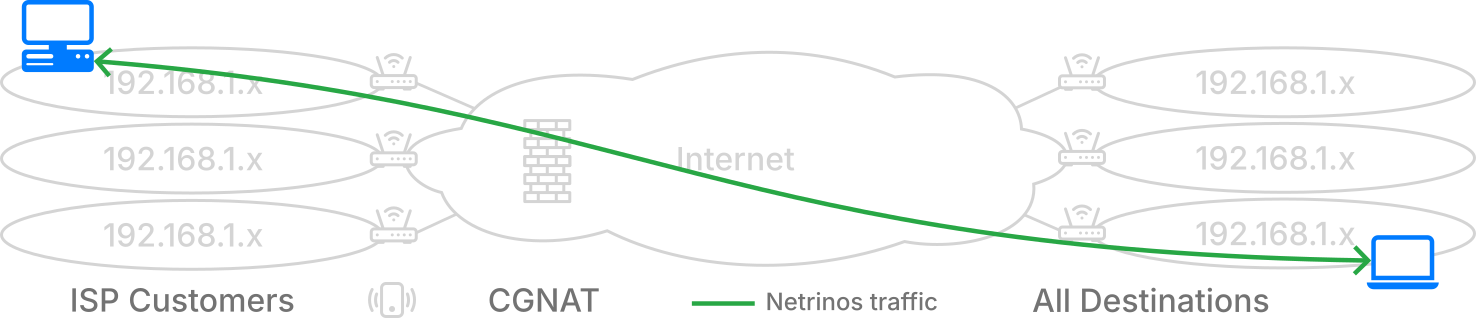
On the private network your server keeps a stable address. You reach it from anywhere with the same client software as before, and it survives ISP renumbering, moves, and router swaps. There is a security gain here too. A forwarded port was open to the entire internet, and port scanners found it. The private address is not on the internet at all. Only users in your account can reach it, and from the outside there is nothing to find. Under the hood, Netrinos is a mesh VPN built on WireGuard. The technology page covers the mechanics in more depth.
Accessing a Server Behind CGNAT
- Create a Netrinos account and install the app on the server you want to reach.
- Create a user for each person who needs access. They install the app on their own machines. Everyone in your account shares one private network, and nobody outside the account can see it.
- They open the app, see your server in their device list, and connect to its address instead of a public IP. Same ports, same client software, whether that is a file browser, remote desktop, or a camera viewer.
That is the whole setup. No router settings, no public IP, and nothing breaks when you move or the ISP renumbers. The same account reaches the office NAS from a hotel room or the camera recorder back at the shop, over the same connection where port forwarding fails.
Other Ways Around CGNAT
Netrinos is not the only way around CGNAT. The right route depends on who needs to reach your machines.
Ask your ISP for a public IP. Some ISPs may take you off CGNAT on request. Others may sell a static IP as a monthly add-on.
IPv6. IPv6 gives every device a public address again, and if your ISP provides it, inbound connections work. The problem is the other end. Everyone connecting to you needs working IPv6 too, and residential and small-business networks still often do not have it.
Rent a small cloud server and tunnel. A cheap VPS has a public address. You run a tunnel from your machine to the VPS, and users connect to the VPS. This is a well-worn path, but you pay monthly for the server and you maintain both ends yourself.
Use a hosting service. For a service the general public should reach, this is the honest answer. A hosted server has a public address by definition, and CGNAT at your site stops mattering.
Closing
CGNAT is becoming more prevalent. IPv4 addresses ran out and ISPs need to deal with that. Port forwarding assumes your router holds a public address, and increasingly it does not.
For machines that only you and your users need to reach, a public address was never required. Netrinos is free for personal use, and Pro for business use starts at $10 a month with a 14-day trial. Both work behind any CGNAT, including Starlink and cellular.