The Technology Behind Netrinos
A mesh-based overlay network built on WireGuard®, with zero-configuration NAT traversal, automatic key management, and cryptographically enforced access control.
Overview
Netrinos creates a full mesh network where every device maintains direct encrypted WireGuard tunnels to all other devices. Unlike traditional VPN architectures that route traffic through a central server, the mesh topology enables direct peer-to-peer communication with no single point of failure.
The connections are bidirectional, creating an overlay network that functions like a LAN across the public internet. Once connected, any device can initiate communication with any other device, regardless of which device is behind NAT. This enables use cases that traditional VPNs cannot support, such as a home server pushing notifications to a laptop or a laptop accessing a home NAS from anywhere.
The system handles all configuration automatically. Devices authenticate once during installation, then cryptographic keys are distributed and connections are established without user intervention. NAT traversal works through firewalls and carrier-grade NAT without requiring port forwarding or network configuration. All communication is encrypted end-to-end.
WireGuard Foundation
Netrinos uses WireGuard for all data plane encryption. WireGuard is a VPN protocol with native support on Linux, Windows, macOS, iOS, and Android, and is used in production by Cloudflare, Mullvad, NordVPN, and other large-scale deployments.
Why WireGuard?
- Performance: The protocol has minimal overhead. Benchmarks typically show 3-4x higher throughput compared to OpenVPN.
- Cryptography: ChaCha20 for symmetric encryption, Poly1305 for authentication, Curve25519 for key exchange, BLAKE2s for hashing, HKDF for key derivation.
- Codebase size: Approximately 4,000 lines of code compared to 100,000+ for OpenVPN or IPsec implementations.
Cryptographic Properties
WireGuard provides these security guarantees:
- Identity = Public Key: Each device is identified by its Curve25519 public key. The protocol does not use certificates, PKI, or certificate authorities. Possession of the private key constitutes device identity.
- Perfect Forward Secrecy: Session keys are derived using ephemeral Diffie-Hellman key exchange. Compromise of a device does not expose past session traffic. Session keys rotate every 2 minutes.
- Replay Protection: The protocol uses nonce counters and timestamp-based handshake cookies to prevent replay attacks. It handles packet reordering and duplication.
- Attack Surface: The protocol does not respond to unauthenticated packets, making it silent to port scanners and network probes.
See the WireGuard protocol documentation for full technical details.
The Netrinos Layer
WireGuard is a point-to-point protocol that requires manual configuration of keys, endpoints, and allowed IPs. Netrinos adds a configuration management layer that automates these tasks to create a zero-configuration mesh network. Control plane communication between devices and the Netrinos broker (rendezvous server) uses TLS encryption over HTTPS.
Key Management
Each device generates its own WireGuard keypair. The private key never leaves the device. If the private key is lost for some reason, a new keypair will be generated and Netrinos will manage the public key distribution.
During installation, the client authenticates once using account credentials. It registers its public key with the broker and receives the public keys of other authorized devices. Subsequent authentication is cryptographic and does not use the password.
When a device is removed from an account, its public key is removed from the distribution list. Other devices stop accepting connections from that key on their next synchronization cycle. This revocation process does not require access to the removed device.
NAT Traversal
Most devices operate behind NAT, whether from security firewalls, home routers, cellular modems, carrier-grade NAT, or combinations thereof. Traditional VPNs require port forwarding or DMZ configuration. Netrinos uses coordinated hole punching (also called UDP hole punching or NAT traversal) instead.
When a device initiates an outbound UDP connection, the NAT device creates a temporary mapping that allows response traffic. The broker records each connection's public endpoint (IP and port) and coordinates simultaneous connection attempts between peers. Both devices send packets at the same time, creating bidirectional NAT mappings and establishing a direct tunnel.
This approach works through complex NAT chains, such as multiple layers of routing devices and CGNAT, without requiring firewall configuration or port forwarding.
In rare cases where hole punching fails, traffic routes through a relay server as a fallback. The connection remains end-to-end encrypted.
Netrinos handles roaming automatically. When a device changes networks, such as roaming from WiFi to cellular, it re-registers its new endpoint with the broker. Peers re-establish tunnels automatically within seconds. WireGuard's stateless handshake makes roaming reconnection lightweight, requiring only a single round-trip.
Mesh Topology
Netrinos uses a full mesh topology where each device maintains a direct WireGuard tunnel to every other device. This differs fundamentally from hub-and-spoke VPN architectures where all traffic routes through a central server.
In a mesh topology, traffic flows directly between peers without routing through intermediate servers. This optimizes latency and bandwidth, as performance is limited only by the direct network path between communicating devices. Individual device failures do not affect other connections in the mesh.
Mesh connections are bidirectional. Once established, traffic can flow in either direction between peers, regardless of which device is behind NAT. This differs from traditional VPN architectures where only clients can initiate connections to servers.
Mesh vs Hub-and-Spoke
| Netrinos (Mesh) | Traditional VPN (Hub-and-Spoke) |
|---|---|
| Direct peer-to-peer connections | All traffic routes through central server |
| No central traffic bottleneck | Server bandwidth limits throughput |
| Minimal latency (direct path between peers) | Additional latency from server hop |
| No single point of failure | Server failure breaks all connections |
| Bidirectional connection initiation | Clients cannot connect directly to each other |
| Scales with device count | Server must scale with aggregate traffic |
Network Addressing
Each device receives a static IP address from the 100.64.0.0/10 range. This is shared address space defined in RFC 6598, commonly used for carrier-grade NAT. The assigned IP address persists across network changes, reboots, and reinstalls while the device remains in the account. Because these addresses exist only within the WireGuard tunnels, they do not conflict with the same address ranges used elsewhere on the Internet or in private networks.
Devices are also assigned DNS names in the format devicename.account.2ho.ca. These are real public DNS records that resolve to the device's mesh IP from anywhere on the internet. Unlike most overlay networks that require local DNS configuration or hosts file entries, Netrinos names resolve through standard DNS resolution. This means any application or device that can resolve DNS can address a mesh peer by name, including LAN devices that do not run Netrinos.
Connection Establishment
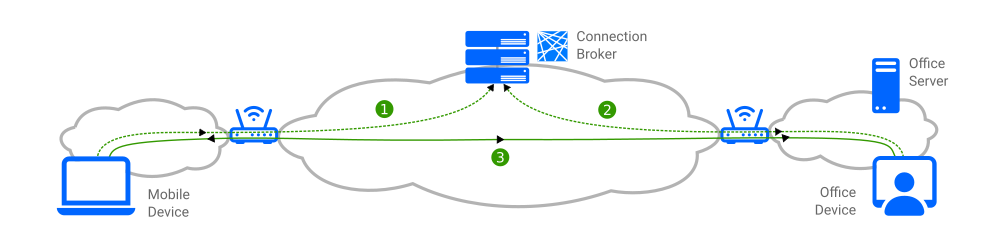
Connection establishment follows this sequence:
- Device 1 Contacts Broker: Device 1 provides its public key and network endpoint. The broker stores this information and returns connection details for other authorized devices in the network.
- Device 2 Contacts Broker: Device 2 provides its public key and network endpoint. The broker stores this information and returns connection details for other authorized devices, including Device 1.
- Direct Tunnel Established: The two devices establish a direct WireGuard tunnel. Traffic flows peer-to-peer without passing through any intermediate server.
The broker facilitates endpoint discovery and NAT traversal coordination. It is not in the data path. Netrinos evaluates multiple connection paths simultaneously and selects the best route before configuring the tunnel, exceeding what vanilla WireGuard can do on its own. After the WireGuard handshake completes, all communication flows directly between peers.
When a direct connection cannot be established, a relay function forwards encrypted packets between peers. This fallback is infrequent and occurs only when restrictive NAT configurations prevent direct hole punching. The relay cannot decrypt the traffic. For increased privacy, users can deploy a private relay on their own infrastructure, ensuring relayed traffic never passes through Netrinos servers.
Advanced Features
Netrinos extends the base mesh with access control, network routing, and virtual device support.
Access Control
Access control policies determine which devices can communicate with each other within the mesh. Netrinos acts as a configuration manager for native operating system firewalls, implementing policies at the kernel level for maximum performance and security.
On Linux, Netrinos configures nftables rules to enforce access policies. On macOS, it uses the pf (packet filter) firewall. On Windows, Netrinos implements a custom Windows Filtering Platform (WFP) driver that operates independently of Windows Firewall, which is frequently misconfigured or disabled by users. This separation ensures that access control policies remain enforced regardless of the Windows Firewall state.
When a device is removed from the account, its public key is revoked and removed from all other devices. This removes the WireGuard tunnel and updates the access control list. The local firewall rules are updated automatically to enforce the new policy.
Gateways & Routing
A device on the mesh can act as a gateway, allowing other peers a route to networks local to that device, including the internet. For example, a gateway on a cloud server lets you browse the internet as if you were in that server's location, accessing region-restricted content or appearing to connect from your office IP while travelling.
Routes are configured on each device individually. Different gateway nodes can provide access to different networks, and each device configures which gateway to use for which destination networks. Traffic is source NAT'd using nftables masquerade (Linux), pf NAT (macOS), or WFP (Windows), appearing to originate from the gateway device's location.
The local routing table is updated automatically on all platforms.
Virtual Devices
Virtual Devices provide mesh access to LAN devices that cannot run Netrinos, such as cameras, NVRs, printers, and game consoles. A Netrinos peer on the same LAN acts as a gateway, projecting a mesh IP (SecureIP) onto the target device using 1:1 NAT.
Mesh Device to LAN Device
When a mesh peer connects to a virtual device's SecureIP, the gateway performs destination NAT (DNAT), rewriting the destination address from the SecureIP to the device's actual LAN IP. Return traffic follows the reverse path via connection tracking. The target device is unaware it is being accessed remotely.
This is implemented using nftables DNAT rules on Linux, pf rdr rules on macOS, and WFP packet rewriting on Windows. Each virtual device has its own DNAT rule scoped to its specific SecureIP and LAN IP.
LAN Device to Mesh Device
Virtual devices can also initiate connections into the mesh. When the LAN device sends traffic to a mesh IP, the gateway performs source NAT (masquerade), rewriting the source address from the device's LAN IP to the gateway's own mesh IP. This is necessary because WireGuard cryptokey routing on the remote peer would reject packets from an unknown source IP.
Only registered virtual device IPs are permitted to send traffic into the tunnel. The masquerade is scoped to a set of registered addresses (nftables on Linux, pf on macOS, WFP on Windows). To enable outbound access, a static route on the local router directs mesh-destined traffic to the gateway's LAN IP.
With virtual devices registered at both ends, two devices that cannot run VPN software can communicate with each other through the mesh. Neither device is aware of the tunnel.
Conflicting Subnets
Traditional subnet routing fails when the local and remote networks use the same IP range. If both sites use 192.168.1.0/24, a device at 192.168.1.50 on one site cannot be distinguished from 192.168.1.50 on the other.
Virtual Devices solve this by assigning each device a unique SecureIP in the 100.64.x.x overlay range. The originating device connects to the SecureIP, not the LAN IP. The gateway at the remote site performs the DNAT translation locally. Because the overlay addresses are globally unique within the mesh, there is no ambiguity regardless of the underlying LAN addressing.
All of these traffic flows stay within the encrypted WireGuard tunnels. At no point is the device or its ports exposed to the public internet.
Mobile Devices
Mobile platforms (iOS, Android) are mesh consumers. They connect to the mesh and can access all peers and virtual devices, but they cannot host virtual devices or act as gateways. This is a platform constraint: mobile operating systems restrict VPN APIs to client consumption and do not permit packet forwarding or hosting services in the background.
Platform Support
| Platform | Implementation |
|---|---|
| Windows | wireguard-nt kernel driver, Windows Filtering Platform (WFP), system tray integration, runs as service |
| macOS | WireGuard userspace via wireguard-go, pf firewall, menu bar integration, universal binary |
| Linux | Kernel module (wireguard-go fallback), nftables firewall, GUI or CLI. .deb, .rpm, tarball |
| iOS | Network Extension framework, WireGuard userspace via wireguard-go |
| Android | VpnService API, WireGuard userspace via wireguard-go |
Questions?
Dive deeper into the documentation or reach out with technical questions.