Features
Reach devices that can't install software. Route traffic to remote networks. Encrypt every connection with WireGuard®.
Or take a Quick Tour
Mesh Networking
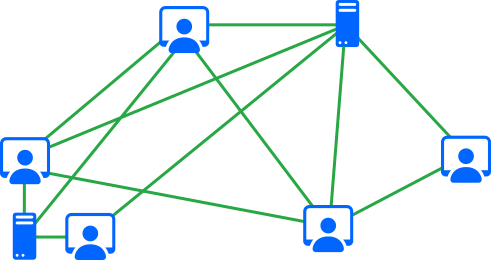
Your devices form a private mesh that handles the hard networking problems automatically.
- Direct connections Traffic flows peer-to-peer between your devices. No central server in the path. Fastest possible route.
- Automatic roaming Switch from WiFi to mobile, move between networks. Your connections stay up. No reconnection, no manual toggle.
- Punches through NAT and firewalls No port forwarding, no static IP, no firewall rules. Corporate firewalls, hotel WiFi, restrictive networks. Netrinos finds a path.
Virtual Devices
Cameras, NVRs, NAS boxes, network equipment: they can't install VPN software. But you still need to reach them.
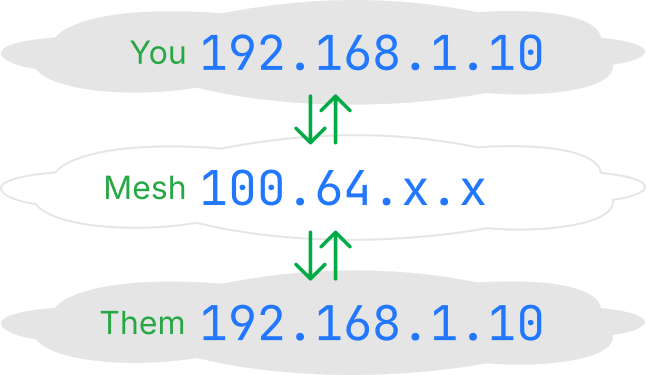
Install Netrinos on one device at the site, a PC, Mac, Linux box, or Raspberry Pi. It projects a Netrinos IP onto any local device you choose. That device becomes accessible from anywhere on your Netrinos network, with its own fixed IP address and DNS name.
- No software on the endpoint The device doesn't know it's being accessed remotely. Each gets a fixed IP and DNS name on the mesh. No agents, no clients, no changes.
- Works both ways Devices can also reach back into the mesh. An Xbox streams from a remote NAS without either running VPN software.
- Conflicting subnets handled Every site can be 192.168.1.x. Doesn't matter. Each device gets a unique Netrinos IP regardless of the local network.
Managing devices at hundreds of sites? Netrinos Edge scales Virtual Devices across multi-site deployments.
Gateways & Routing
Route your internet traffic through another location, or access an entire remote network.
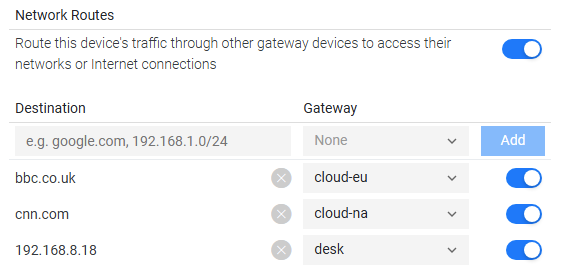
A gateway is any device on your Netrinos network that forwards traffic on your behalf. A route tells your device which traffic to send through it.
- Internet routing Route your web traffic through a device at another location. Access your bank while travelling, bypass hotel WiFi restrictions, or browse from your office IP.
- Remote network access Access devices on a remote LAN through a gateway. Traffic is masqueraded, so remote devices don't need any configuration. It just works.
- Stackable Run gateways at multiple sites. Each one opens access to its local network or internet connection.
Learn more about Gateways & Routing
Multiple Users
Add your team to the network. Each person manages their own devices.
Every user gets their own login and their own set of devices. No shared credentials, no single point of failure. Add a contractor for a project, remove them when it's done. The network adjusts automatically.
Individual Accounts
Each user signs in with their own credentials. Their devices join the network automatically.
Simple Management
Add or remove team members without reconfiguring the network. No VPN profiles to distribute.
Bidirectional Sharing
Users share devices with each other. A developer shares a staging server, a teammate shares a NAS.
Access Control
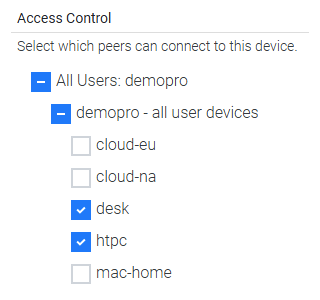
Define which devices can communicate with each other on your Netrinos network.
Not everyone should reach everything. Contractors don't need access to production servers. Guest devices shouldn't see internal resources. Access control lets you set rules that restrict traffic between devices.
- Device and user rules Allow or deny traffic between specific devices, or all devices belonging to a user. A contractor can reach the staging server but nothing else. Simple to set up, easy to manage.
Learn more about Access Control
Security
Every connection is encrypted end-to-end with WireGuard. Your data stays private.
WireGuard Encryption
Every connection uses WireGuard, the protocol trusted by Cloudflare, NordVPN, and Mullvad. Fast, modern, and auditable.
Keys Stay on Device
Encryption keys are generated on your devices and stay there. Not even Netrinos can see your traffic.
We Can't See Your Traffic
Traffic almost always flows directly between your devices. If a relay is needed, it just forwards encrypted packets.
Want more control? Self-host a private relay on your own infrastructure.
Runs Everywhere
Full Featured Desktop
Share devices, access remote networks, control who connects. All included.
Mobile Access
Connect and reach your network devices from anywhere on your phone or tablet.
Any Hardware
Cloud VMs, bare-metal servers, laptops, Raspberry Pi. x86 and ARM. One device to thousands.
Download, install, log in. No config files, no Docker, no dependencies.
A Quick Tour
A quick tour of features working together.
Ready to get started?
Connect your first two devices in under 5 minutes.