Gateways & Routing
Route web traffic through a device in another location
How It Works
Gateways and Routes work together as two sides of the same feature:
- Gateway
- A device on your mesh that forwards traffic to the internet on your behalf
- Routes
- Rules on your local device that send specific traffic through a gateway
When you route traffic through a gateway, websites see the gateway's IP address and location instead of yours.
Example: Access Your Bank While Traveling
You're in Europe and need to pay a bill, but your US bank blocks logins from foreign IP addresses.
- Enable Network Gateway on your home computer
- On your laptop, add a route for
yourbank.comthrough your home gateway - Visit your bank's website. It sees your home IP address and lets you log in.
Only traffic to your bank goes through the gateway. Everything else stays direct.
Other uses: news sites blocked in your location, hotel WiFi restrictions, testing how a site appears from another country.
Setting Up
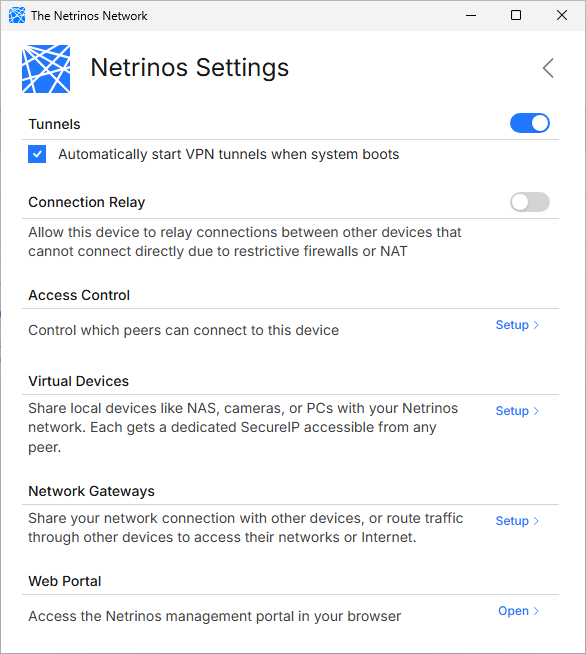
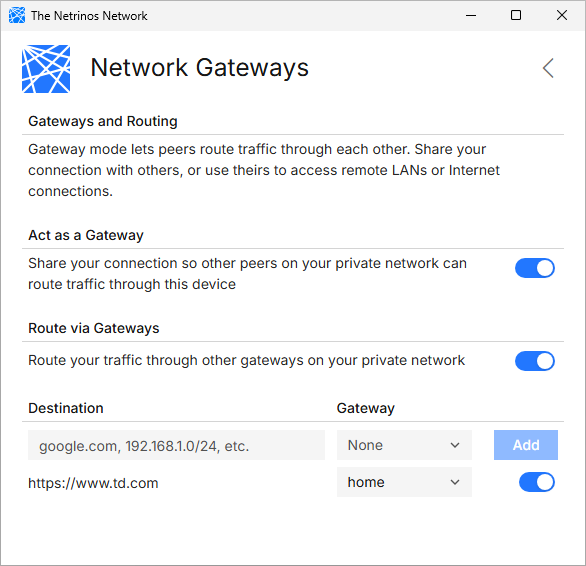
On the gateway device: Open Settings, click Setup next to Network Gateways, and enable Network Gateway.
On your local device: Enable Network Routes, enter a destination (hostname like yourbank.com or IP range), select a gateway, and click Add.
If you can't access the gateway device directly, account admins can enable gateways from the web portal at app.netrinos.com.
Accessing Remote LAN Devices?
Although gateways can reach remote devices, Virtual Devices are much easier to set up and work even when networks have conflicting subnets.